[ComfyUI & VFX] Nuke에서 ComfyUI&AI 를 활용하기 01
Nuke 에 ComfyUI 초기 & 기즈모 셋팅 (OS:Window)
ComfyUI AI를 Nuke(VFX Comp workflow)에 적용하여 효율을 증대 시킬수 있는가 ? Yes.
먼저 ComfyUI 서버를 사용하여 ComfyUI 노드를 사용할 수 있는 API를 셋팅해야한다.
1. ComftUI for Nuke install
.nuke폴더에 git clonegit clone --recursive https://github.com/vinavfx/ComfyUI-for-Nuke comfyui2nuke- Nuke 파이썬 라이브러리에
websocket-client설치 (관리자모드)"C:\Program Files\Nuke15.0v4\python.exe" -m pip install websocket-client menu.py에 코드 추가import comfyui2nuke as comfyui comfyui.setup().nuke/comfyui2nuke의settings.py환경 잡아주기- ComfyUI 만 수정하였다.
COMFYUI_DIR = os.getenv('NUKE_COMFYUI_DIR', 'D:\ComfyUI')
- ComfyUI 만 수정하였다.
2. ComfyUI Gizmos for Nuke install
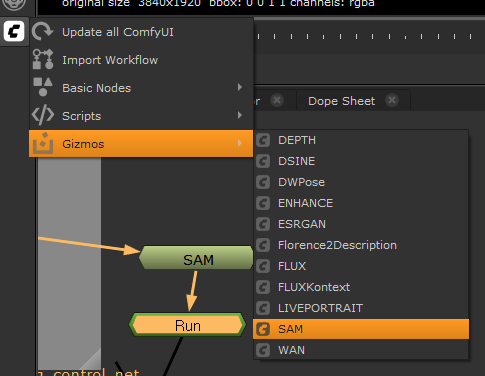
.nuke\nuke_comfyui\nodes폴더에 기즈모 clonegit clone https://github.com/vinavfx/ComfyUI-Gizmos-for-Nuke Gizmos- Nuke 를 실행하여 ComfyUI 기즈모 확인
Reference
- ComfyUI for Nuke URL : https://github.com/vinavfx/ComfyUI-for-Nuke
- API to be able to use ComfyUI nodes within nuke, only using the ComfyUI server
-
ComfyUI Gizmo for Nuke URL: https://github.com/vinavfx/ComfyUI-Gizmos-for-Nuke
-
https://www.alexanderrichtertd.com/post/comfyui-in-nuke-td-meetup